For shops, wholesalers and multi-branch retail
Know what you have.
Know what you’re owed.
Your stock, your billing and your books in one place — each one updating the others as you sell, so nobody re-types anything.
Free for 14 days — no card. Set it up on your own stock before you decide anything.
Revenue today
AED 18,430
+12.4%
Orders fulfilled
247
+6.1%
Stock value
AED 1.24M
+8.4%
Gross margin
34.2%
+2.1%
Revenue · rolling
liveLive activity
auto-postingSale SL2026060044 posted · stock −3
Dubai Mall Branch
Stock received against PO-0182
Main Warehouse · WAC updated
Transfer TRF-0091 completed
Warehouse → Deira Branch
Payment AED 4,200 allocated
INV-002841 marked paid
Your own workspace, ready in about a minute · Multi-branch from day one · Leave whenever — your data goes with you
Already running in live retail and wholesale businesses
15days
free to try, no card
~1min
to your own workspace
0
setup fee, no contract
2
countries — UAE and India
Not a prototype: multi-branch retailers run their daily trade on it, and a full year of live trading — sales, purchases, returns and bank statements — has been migrated into it and reconciled.
The actual product
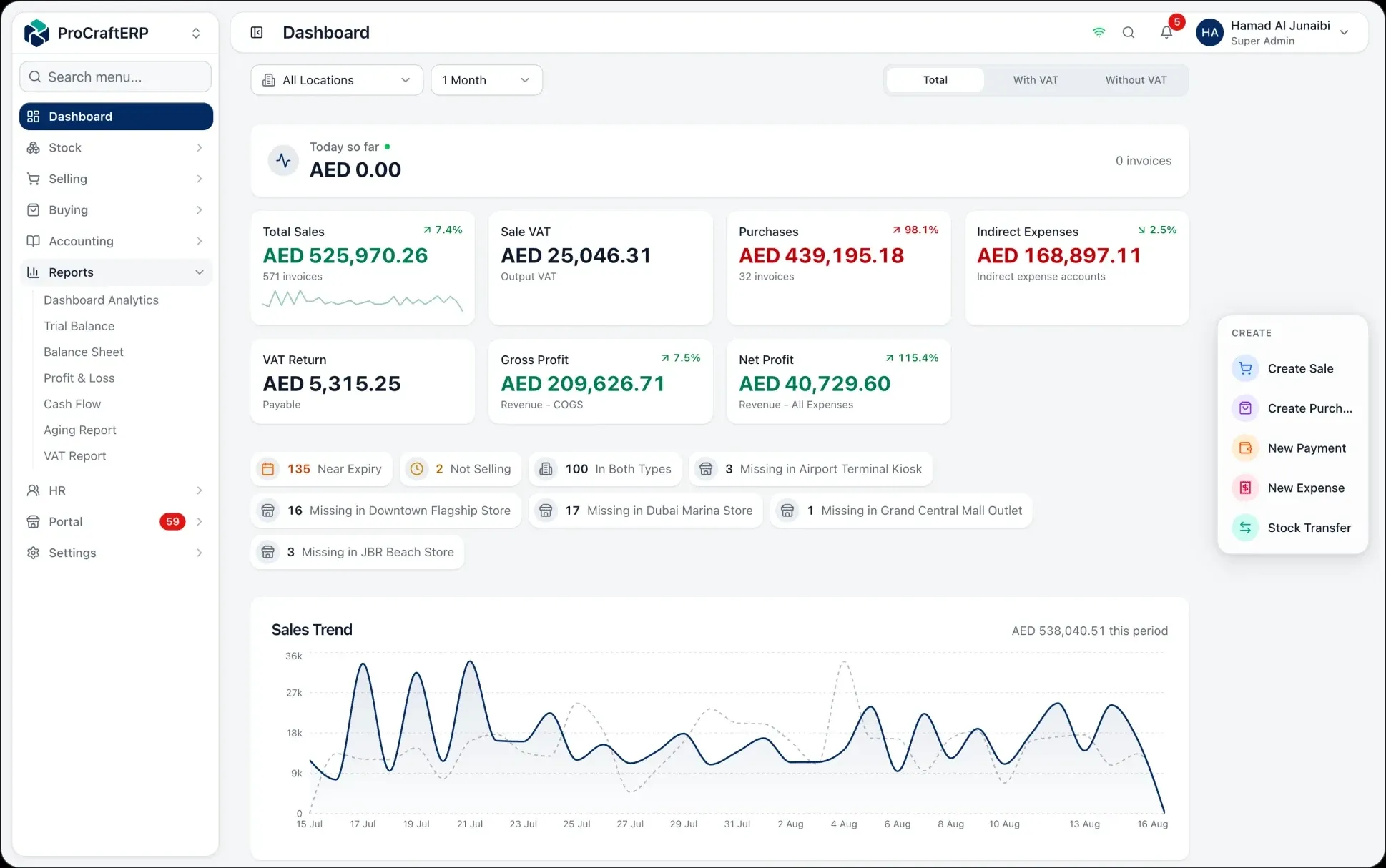
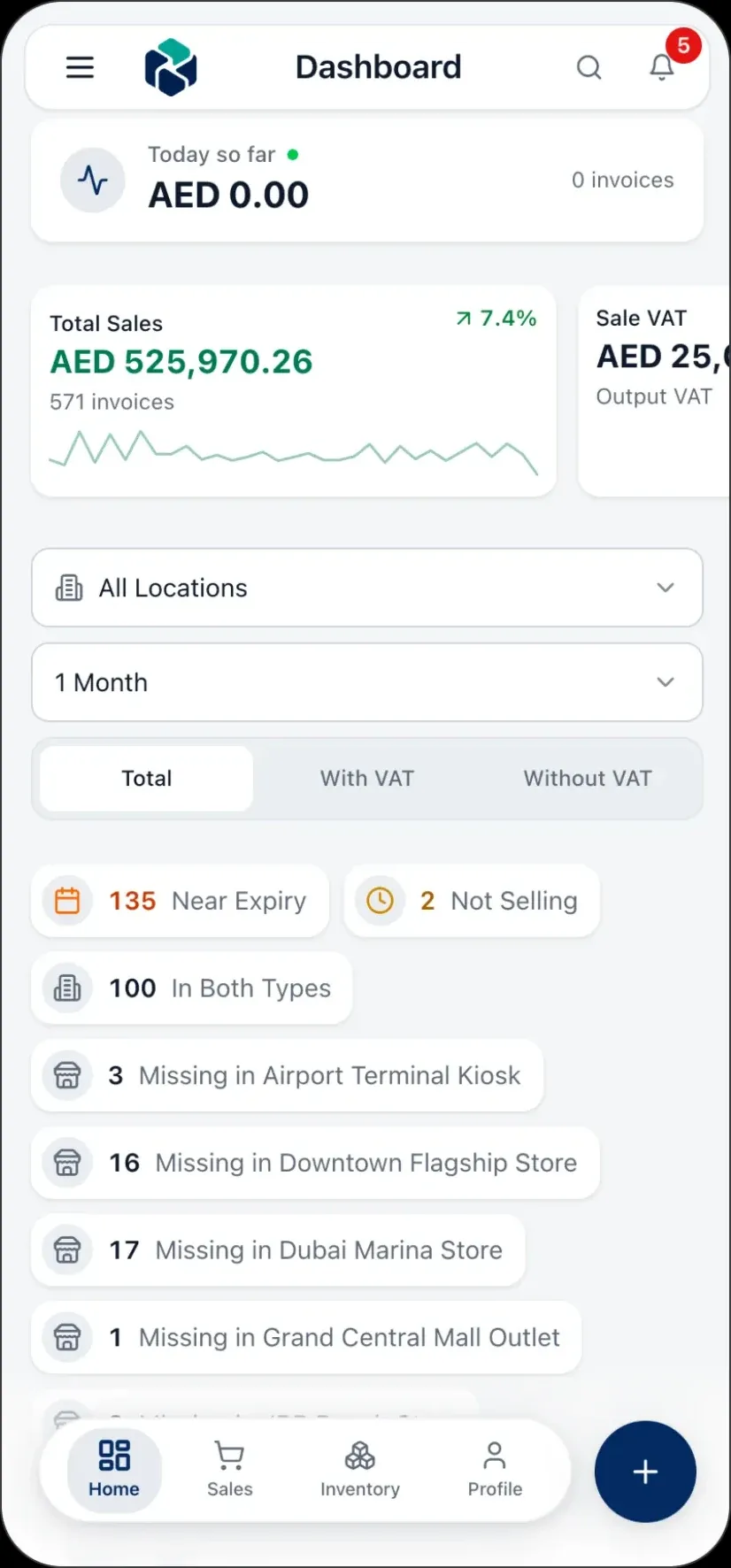
The real interface. Invented numbers.
The same ProCraft ERP your team runs on the back-office desktop and carries on the shop floor — multi-branch sales, VAT, gross profit and inventory, live on every screen. The figures below belong to a business that does not exist; we do not put our customers’ books on our website.
See it move
Understand ProCraft ERP in five seconds.
Stock flows from supplier to customer. Every hop is counted, costed, and posted — so the number on the shelf and the number in the books are never two different things.
Before ProCraft ERP
Your business runs on tools that don't talk to each other.
The POS knows what you sold. A spreadsheet thinks it knows the stock. WhatsApp holds half the orders. And the books? They'll catch up in three weeks — if the re-typing goes well.
It was never a people problem. It's what happens when stock, sales, and accounting live in different places.
And the gaps have a price — the receivable nobody chased, the stock the sheet swears is there, the discount nobody approved. You pay it every month. It just never arrives as an invoice.
The workflow
From purchase order to balanced books.
Six steps, one system. Every stage feeds the next — and posts its own accounting as it happens, so the last step is already done.
Step 1 · Purchase
Raise the order.
Create purchase orders to suppliers with payment terms, expected costs, and the receiving location set up front.
38 open POsStep 2 · Receive
Take it in.
Receive against the PO. Weighted-average cost recalculates automatically, so every unit knows what it actually cost you.
WAC auto-updatedStep 3 · Store
Shelve it, anywhere.
Stock lands per location with batch numbers and expiry dates. Transfer between branches without losing the trail.
12 warehousesStep 4 · Sell
Sell everywhere.
At the counter, on Shopify, or through the customer portal. Scan, pick the customer, done — stock deducts instantly.
247 orders todayStep 5 · Ship
Get it out.
Pick, pack, and dispatch with delivery notes and cargo-company tracking, so fulfilment stays accountable.
Delivery trackedStep 6 · Reconcile
The books are already done.
Every step above posted double-entry GL as it happened — COGS, revenue, VAT. Trial balance, P&L, and VAT report are current to this second.
Trial balance: balanced
What you get
Six jobs your current setup makes hard. Handled.
One platform
Everything that moves. Tracked.
No bolt-ons, no exports between tools. Each module writes to the same ledger and the same stock the moment something happens.
Purchasing
POs, receipts, supplier terms.
Receive against PO with weighted-average costing.
Sales
Counter, online, and portal.
Transfers
Move stock between branches.
Returns
Credit & debit notes.
Payments
Collect, allocate, reconcile.
Analytics
Reports current to the second.
P&L, balance sheet, cash flow, aging, VAT.
Why ProCraft ERP
ERP-grade accounting. Without the ERP project.
ProCraft ERP
One system, running in days.
- Live stock per product, per branch
- Double-entry GL on every transaction
- One-click UAE VAT report
- 173 permission controls, full audit log
ERP-grade details we didn't skip:
Starting
Try it on your own stock for 14 days.
Not a sandbox with sample data — your items, your branches, your invoices. If it does not fit how you trade, you will know inside a week.
Today
Your own workspace, in about a minute.
At your own address, with your own company name on it. No card, no sales call, nobody to schedule.
Days 1–15
The whole product, on your real stock.
Every branch, every module you switch on. Import your items, raise real invoices, and see whether the books come out right.
Day 15
Nothing happens automatically.
There is no card on file, so there is nothing to charge and nothing to cancel. Choose a plan to carry on — or do not, and take your data with you.
Which one you are depends on branches and staff — not on features.
Professional
A few branches and a growing team.
- 15 staff user seats
- 4 locations
- accounting and payroll included
Enterprise
Many branches and a back office.
- 40 staff user seats
- 12 locations
- accounting and payroll and online store included
- No card to start
- Change or cancel any month
- Your data exports whenever you want
FAQ
What people ask before they start.
AED 79 a month in the UAE, ₹999 in India, billed annually — that is one shop with stock, billing, purchasing and a POS, and no cap on how many invoices you raise. Double-entry accounting and payroll come with Professional; Shopify sync, an online store, a gym or a trust day-book are modules you turn on only if you want them, so you never buy one to unlock another. The first 14 days are free and you do not enter a card to begin.
Less than you expect. You import products, stock, customers and suppliers from Excel, and opening balances from CSV. The same tooling has moved a full year of live trading — sales, purchases, returns and bank statements — into a working deployment. You start from your own numbers, not from an empty system.
In the UAE, fully. 5% VAT is calculated on every transaction, invoices issue as Tax Invoices or Simplified Tax Invoices, and the VAT report splits output VAT on sales from input VAT on purchases with the net payable — the figures your FTA return needs. In India, not yet. Your workspace gets rupee pricing, an India chart of accounts and your GSTIN on file, but GST is not calculated on invoices and GST returns are not available — that engine is still being built. We would rather you knew that now than at go-live.
That is the normal case here, not an upgrade. Stock is tracked per product per location, transfers between branches leave a documented trail, staff can be limited to their own branch, and every report rolls up across all of them.
Yes, in detail. Roles are built from individual permissions, so a salesperson can sell at their own branch without ever seeing margins, payroll, or the other branches. Every action is logged with the user, the time and the IP address, so you can always see who changed what.
It keeps running, and your workspace becomes the source of truth behind it. Paid Shopify orders arrive as sales on their own, with stock deducted and accounting posted; your stock levels push back out to Shopify; and a built-in check proves the two agree. Anything that fails to sync queues up for a one-click retry.
Nothing is deleted the moment a payment fails. Your workspace goes read-only for a grace period, so you can still open it, read everything and export your data — you simply cannot post new transactions. Only after that does it suspend. Your data is yours, it is exportable throughout, and there is no contract to see out.
Start today. The first 14 days are free.
No card, no setup fee, nobody to call first. Your workspace is ready in about a minute, at your own address, with your own data.
Rather look around first? The demo is the real app, filled with sample data. No signup.